![Nautilus-Logo-Color-TM-4.webp]](https://nautilussolar.com/hs-fs/hubfs/Nautilus-Logo-Color-TM-4.webp?height=50&name=Nautilus-Logo-Color-TM-4.webp)
You have the choice between two community solar billing options:
Note: You can always request to switch your bill option later by contacting our customer care team. There is no fee to switch your bill option. There is no impact in your monthly savings by choosing one bill option over the other.
One-Bill Option
With the one-bill option, you’ll receive one monthly energy statement from Nautilus Solar that includes:
- Your share of solar energy at a 5% discount compared to Xcel’s standard rates.
- Xcel’s supply and delivery charges for any additional energy usage beyond your solar generation.
With this option, you do not pay your Xcel bill directly because their charges are on your Nautilus statement. We pay your Xcel bill on your behalf.
After enrollment is completed, you will need to keep paying Xcel Energy directly until you receive a Nautilus statement with "Utility Total Charges" included.
Why does Xcel Energy still send you a bill?
Each month, Xcel will still provide you with an electronic copy of your utility bill, but you do not pay this bill directly.
Your Xcel Energy bill includes a detailed breakdown of your monthly energy usage and charges.
Will Xcel Energy still get paid on time?
Yes. You should receive your Nautilus bill just a few days after your monthly Xcel bill.
Your Nautilus autopayment due date is scheduled with plenty of time for us to ensure Xcel is paid on time.
How do you enable the one-bill option?
To ensure you are on the one-bill option:
-
Go to your Nautilus Solar customer account and update your Xcel login credentials. You can do this in the "Update Utility Login" tab.
-
In you Xcel account, turn e-bill ON and autopay OFF
Why do you need to complete these steps?
-
By confirming your account credentials, we can successfully pay your utility on your behalf.
-
Turning e-bill on with Xcel ensures you still get your statements in a timely manner.
-
Turning autopay off ensures you don't double pay your utility charges since we include them on your Nautilus statement.
How does Nautilus Solar billing work?
To best understand your community solar savings, let’s look at an example.
Every month, we’ll send your Nautilus Solar statement to the email address on your account.
Your billing history is also available on your customer account at https://nautilussolar.com/account.
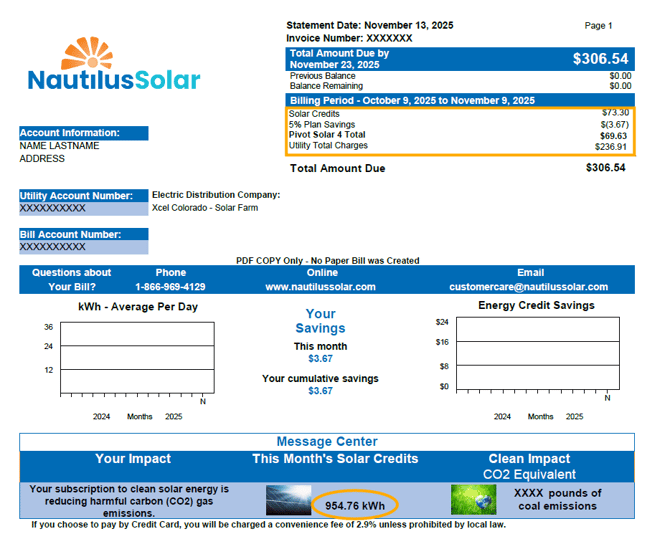
In the example below, 954.76 kWhs of energy were generated for this customer by one of our solar farms. This energy would usually cost $73.30. However, with Nautilus Solar, you save 5% on this energy.
Nautilus passes the $236.91 (utility total charges) to Xcel Energy for you.
How does this work with your Xcel Energy bill?
Your Xcel bills include your monthly total energy usage, your utility rates, and the breakdown of your energy charges for the energy beyond what your Nautilus Solar subscription generated.
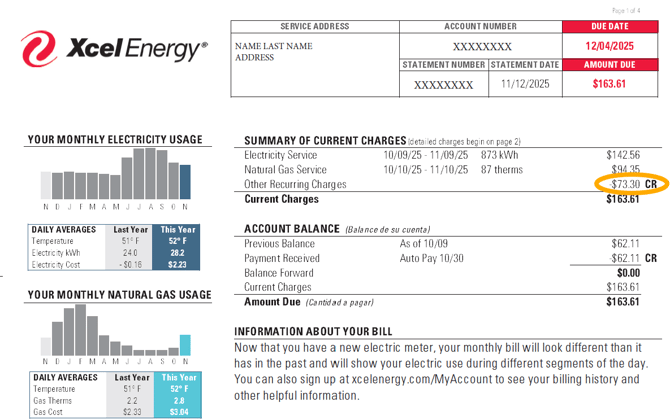
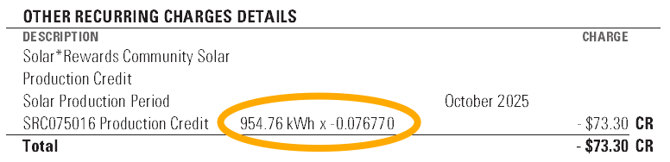
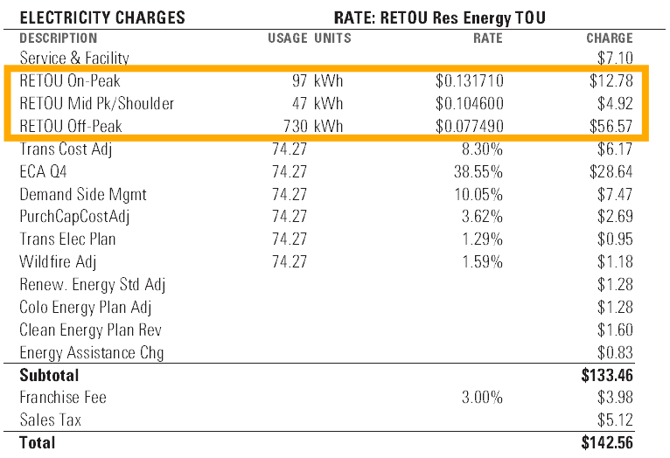
For the monthly energy usage remaining after the deduction of the 954.76 kWh of solar energy, Xcel calculates the supply and delivery charges on the Xcel bill.
In this example, the solar farm produced more than the customer's monthly usage. Beyond this, Xcel bills for various energy fees and the month's natural gas charges.
Electricity Charges represent the total cost of generating and transporting energy to your home or business during the billing cycle.
When will I receive my Nautilus statements?
If you choose the one-bill option, your Nautilus bill will be emailed to you a few days after your Xcel bill and will include your Xcel charges.
When will I receive my first bill from Nautilus?
Once we place you on an active solar farm, you can expect your first invoice within 1-3 billing cycles. You will need to keep paying Xcel directly until you receive a Nautilus statement with "Utility Total Charges" included.
Make sure you turn autopay off with Xcel, so you don’t accidentally double pay your utility charges. If you accidentally pay Xcel directly, they will add this as a credit to your account since our bill also includes their charges.

Dual Bill Option
Prefer to keep things separate? With dual billing, you’ll receive a statement from Xcel Energy and a statement from Nautilus Solar:
-
Xcel Energy Utility Bill: Shows your total monthly energy usage. Your solar generation is deducted from these charges, reducing the amount you owe to your utility company.
-
Nautilus Solar statement: The solar energy generated by your solar farm is not free. Instead, it is billed separately by Nautilus at a 5% discount on what Xcel Energy would charge you.
Yes, you pay two bills, but you are still saving money every month.
Note: Your monthly savings are not impacted if you use dual billing over the one-bill option.
What Does Your Nautilus Solar Statement Look Like?
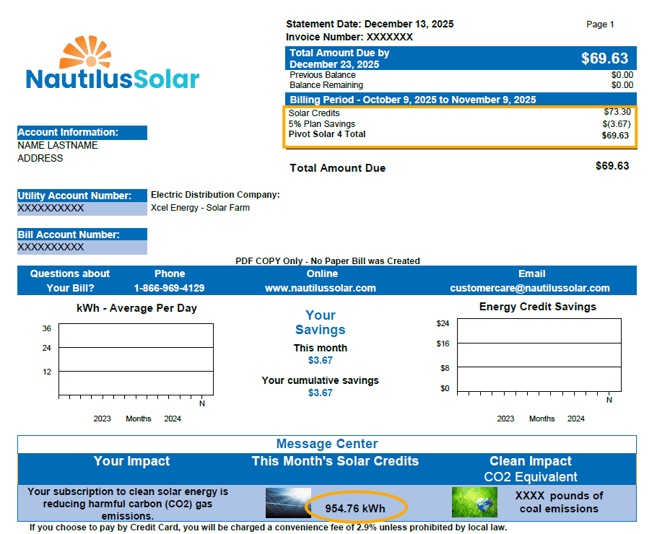
How does this work with your Xcel Energy bill?
Your Xcel bills are still handy because you can see the details about your monthly total energy usage, your utility rates, and the breakdown of your energy charges for the energy beyond what your Nautilus Solar subscription generated. Let's look at an example.
This is the calculation of what is owed to Xcel Energy this month:
Total Electricity Charges: $142.56
-$73.30 for your Nautilus Solar energy generation
+$94.35 for Xcel Natural Gas charges
=$163.61 owed to Xcel Energy
For the monthly energy usage remaining after the deduction of the 402 kWh of solar energy, Xcel calculates the supply and delivery charges on the Xcel bill.
Below is the calculation of monthly energy usage using Xcel’s standard rates.
Electricity Charges represent the total cost of generating and transporting energy to your home or business during the billing cycle.
When will I receive my Nautilus statements?
For customers with dual billing, Xcel will likely send you a statement just a few days after your billing period ends. Your invoice for the same period from Nautilus Solar Energy may lag by 1-2 months. This delay reflects the time it takes for Xcel to send us details about your monthly solar credit generation.
When will I receive my first bill from Nautilus?
Once we place you on an active solar farm, you can expect your first invoice within 1-3 billing cycles.

Frequently Asked Billing Questions
What Are Solar Credits?
Solar credits are simply the amount of energy generated by Nautilus Solar instead of Xcel. This energy is deducted from your Xcel bill and is charged by Nautilus Solar instead at a discount.
Is Autopay Required?
Yes. Autopay is required for all Nautilus Solar customers.
You can update your payment method (credit card, debit card, or bank account) by logging in to your customer account at https://nautilussolar.com/account.
Can I Receive a Paper Bill from Nautilus?
Unfortunately, we do not offer a paper bill option for our monthly community solar statements. Instead, we send your monthly statement to the email address on your account.
You can update your preferred email address under ‘Contact Preferences’ in your customer account at https://nautilussolar.com/account.
Still Have Questions?
No worries! We know energy bills can sometimes be confusing, and we want you to be confident in your solar savings.
Give us a call at (866) 969-4129 or send us an email at customercare@nautilussolar.com.