![Nautilus-Logo-Color-TM-4.webp]](https://nautilussolar.com/hs-fs/hubfs/Nautilus-Logo-Color-TM-4.webp?height=50&name=Nautilus-Logo-Color-TM-4.webp)
In the Nautilus customer portal, you can submit a service request with any questions or requests you have. Your message will be sent directly to our customer care team.
Submitting a request helps our customer care team review your message and respond efficiently.
Accessing the Service Requests Tab
-
Login to your customer portal at https://nautilussolar.com/account.
- Your username is your email address.
- Your password is the one you created when you enrolled with Nautilus Solar.
-
Once logged in, select the Service Requests tab or click the Contact Customer Care button.
.png?width=670&height=89&name=image%20(6).png)
Creating a Service Request
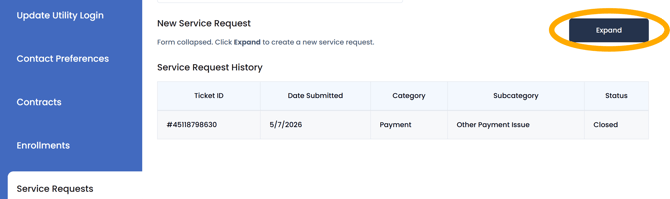
- In the Service Requests tab, click the expand button under New Service Request.
- Fill out the required fields and share any details that will help us understand your request or question.
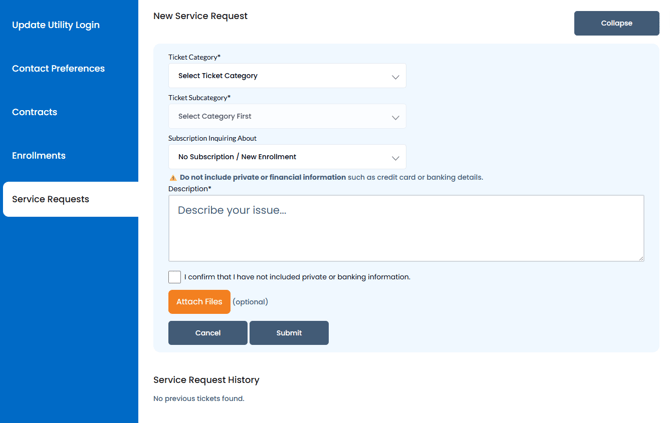
- You can also attach any supporting files, documents, or images to the request.
- When finished, click Submit. Your request will be reviewed by our customer care team, who will follow up with you within 24-48 business hours.
Note: Please confirm that your request does not include private information or banking details.
Viewing Open Service Requests
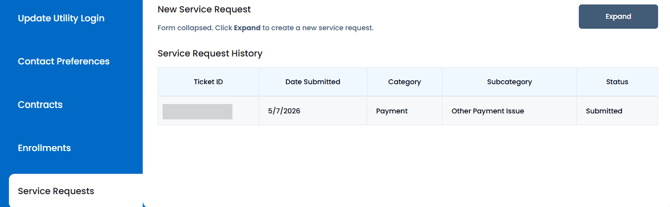
You can view your submitted requests under Service Request History.
This includes the category and the status of the request.
Prefer to Talk to Someone?
No worries! We are more than happy to help!